Rohan Dakave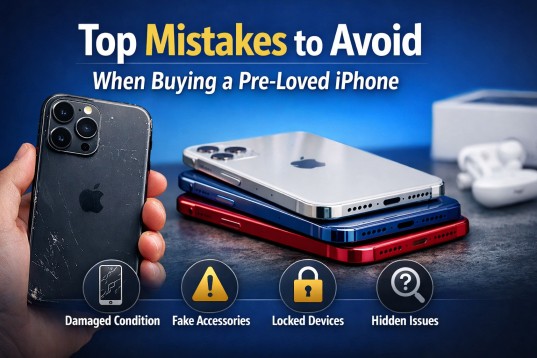
Buying a pre-loved iPhone can be a smart and budget-friendly decision. Many buyers choose second-hand or refurbished devices to enjoy premium features at a lower cost. However, without proper checks, you may end up with a device that has hidden issues, poor battery life, or even activation problems. To help you make a safe and confident purchase, here are the top mistakes to avoid when buying a pre-owned iPhone.
Ignoring the Device Condition
One of the biggest mistakes buyers make is not carefully inspecting the physical condition of the phone. Scratches, dents, and cracks may seem minor, but they can indicate how the device was handled by the previous owner.
Always check the screen for dead pixels, touch sensitivity issues, or discoloration. Examine the back panel and edges for signs of heavy impact. If possible, hold the device in your hand and test the buttons, camera, and speakers before making a final decision.
NOTE :- Customers who searched for a Used iPhone UAE option were offered affordable pricing and verified quality devices. Every phone was carefully tested and ensured to meet performance standards. Buyers were guided through smooth transactions. For trusted service and genuine devices, contact GLP Wireless today.
Not Checking Battery Health
Battery performance plays a major role in the overall experience of an iPhone. Many buyers forget to verify battery health before purchasing. Over time, lithium-ion batteries degrade, which can lead to shorter usage time and unexpected shutdowns.
Go to Settings, then Battery, and check the Battery Health percentage. Ideally, it should be above 85 percent for reliable daily use. If the battery health is significantly lower, you may need to replace it soon, which adds to your overall cost.
Overlooking Activation Lock and iCloud Status
Failing to check the iCloud status is a serious mistake. If the device is still linked to the previous owner’s Apple ID, you will not be able to activate or use it properly. This issue is known as Activation Lock.

Before buying, ensure that the device has been fully reset and is not connected to any Apple ID. The phone should display the initial setup screen. This confirms that the device is ready for a new user.
Skipping IMEI Verification
The IMEI number helps confirm whether the device is genuine and not reported as lost or stolen. Many buyers skip this step, which can lead to major problems later.
Dial *#06# to find the IMEI number and verify it through official channels or your network provider. Make sure the IMEI on the device matches the number printed on the box if available. This simple check can save you from purchasing a blocked or blacklisted phone.
Buying Without Testing All Features
Some buyers focus only on the screen and camera while ignoring other essential features. A complete test is important before finalizing the deal.
Check Wi-Fi connectivity, Bluetooth, Face ID or Touch ID, microphone, speaker, charging port, and camera quality. Insert a SIM card to confirm network connectivity. Testing these features ensures you are not facing hidden technical issues.
Ignoring Storage Capacity Needs
Another common mistake is choosing a device with insufficient storage. While the price may be attractive, a lower storage variant can become frustrating if you frequently use apps, capture photos, or record videos.
Think about your daily usage before selecting the storage option. Choosing the right capacity at the beginning prevents the need for constant data management or cloud upgrades.
Not Comparing Market Prices
Many buyers rush into a purchase without comparing prices from multiple sellers. As a result, they may overpay for the same model.
Research current market rates for the specific model and condition you want. Compare prices from trusted retailers and individual sellers. Understanding the average price range helps you negotiate better and avoid inflated offers.
Ignoring Warranty or Return Policy
A warranty or return policy provides peace of mind, especially when buying a second-hand device. Private sellers often do not offer any protection after the sale.
Whenever possible, buy from a seller who provides at least a short testing period or limited warranty. This allows you to identify any hidden defects after purchase and ensures better buyer protection.
Not Confirming Original Parts
Some pre-loved iPhones may have replaced screens, batteries, or other components. While replacements are not always a problem, low-quality parts can affect performance and durability.
Check if the device shows any repair notifications in settings. Ensure that the display quality, touch response, and camera clarity are consistent with original performance standards.
Relying Only on Online Photos
Online listings often use high-quality images that may not accurately represent the actual condition of the device. Depending solely on photos without verification can lead to disappointment.
If buying online, request real-time images or videos of the device. Ask for close-ups of the screen, edges, and serial number. Clear communication with the seller reduces the risk of unpleasant surprises.
Conclusion
Buying a pre-loved iPhone is a practical way to enjoy premium technology at a lower price, but it requires careful attention to detail. By avoiding common mistakes such as ignoring battery health, skipping IMEI checks, overlooking activation lock, and failing to test features, you can make a safe and confident purchase.
For More Insightful Articles Related To This Topic, Feel Free To Visit: https://blogingers.com/

 Adnan Khan
 paul walkers