Sahu
Sahu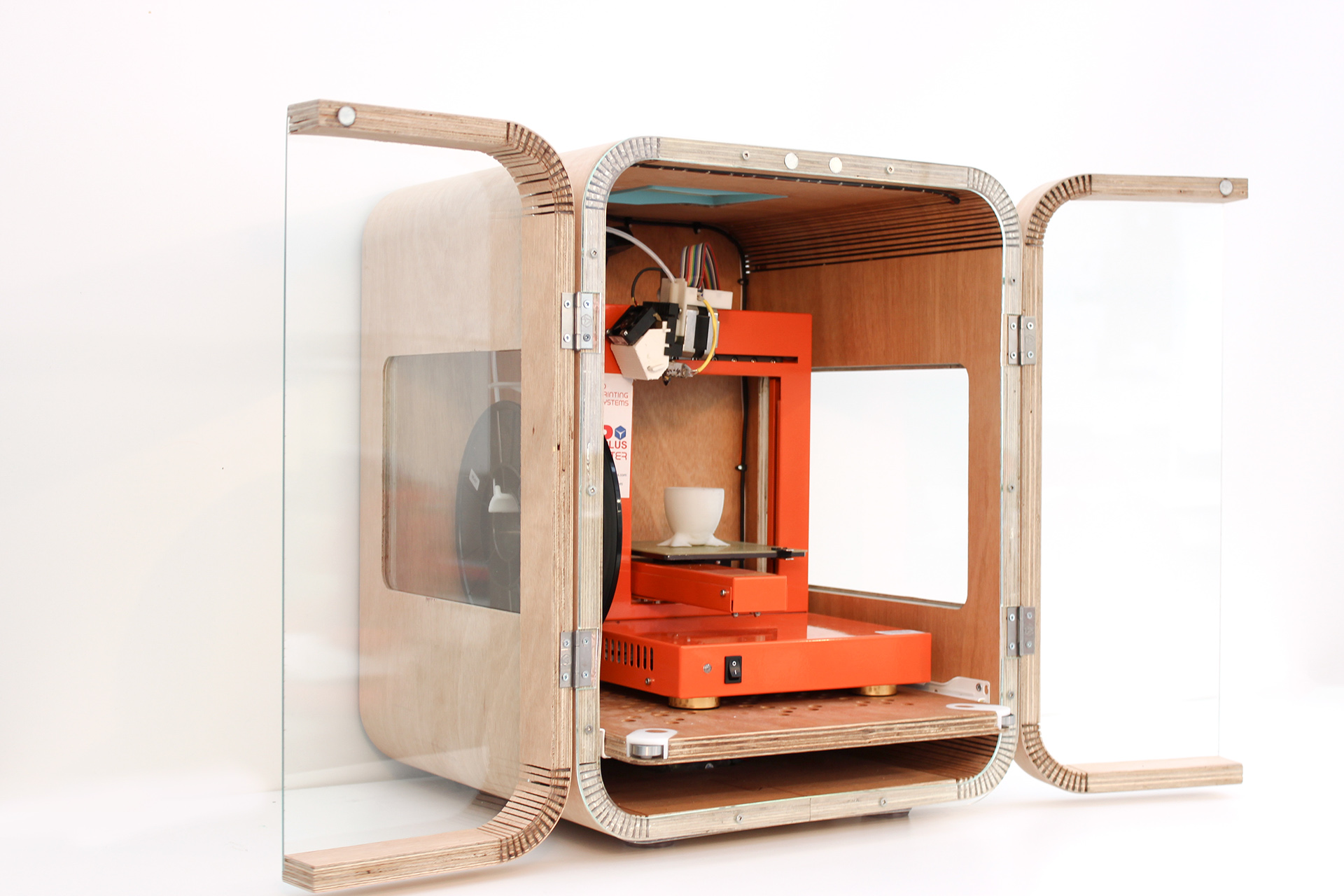
3D printing continues to grow in popularity, from hobbyists printing miniatures to engineers developing functional prototypes. But as powerful as modern printers are, the environment around them affects performance more than most users realize. Temperature changes, dust, drafts, noise, and safety risks can all impact print results. That’s where a 3D printer cabinet comes into play.
Instead of seeing it as just a cover or box, think of it as a controlled workspace. It helps stabilize conditions, protect your equipment, and ultimately improve print success rates. In this article, we’ll explore how a cabinet enhances print quality and why it can contribute significantly to safety and reliability.
Why Use a 3D Printer Cabinet?
Many beginner-level printers operate openly on a desk or shelf. While that works for basic materials like PLA, other filaments and longer prints benefit greatly from a controlled environment. A 3D printer cabinet creates a barrier between your printer and the outside world, minimizing errors and providing better workspace management.
Key Benefits at a Glance:
- Stable temperature during printing
- Less warping and layer separation
- Reduced dust and debris
- Lower noise levels
- Improved safety for homes, classrooms, and workshops
For anyone seeking consistent, reliable print results, especially with engineering-grade materials, a cabinet becomes more than a convenience; it becomes an upgrade.
How a 3D Printer Cabinet Improves Print Quality
1. Stabilized Temperature
Filaments like ABS, ASA, Nylon, and Polycarbonate require stable heat for proper adhesion and strength. When exposed to cold air or drafts, they tend to warp, curl at the edges, or form cracks.
A 3d printer cabinet helps maintain a consistent temperature inside the print area by trapping warm air produced by the bed and nozzle. This prevents sudden cooling and keeps layers bonding smoothly.
2. Better Adhesion and Layer Strength
Inconsistent temperature often leads to weak layer bonding. With better heat retention, the plastic cools uniformly from layer to layer, resulting in stronger parts and fewer failed prints.
3. Cleaner Surface Finish
The smoother environment also reduces microvibrations and external interference, helping the model achieve a cleaner surface. This is especially noticeable on large prints or detailed objects.
Safety Advantages of Using a 3D Printer Cabinet
3D printers involve moving parts, heated surfaces, and sometimes strong fumes, depending on the material. A cabinet provides a level of protection you can’t get from an open setup.
Shields from Direct Contact
In homes with kids or pets or in educational environments, a cabinet keeps the printer secure and reduces accidental contact with heated parts.
Helps Contain Fumes
Materials such as ABS and ASA can emit noticeable odours during printing. Some cabinets can be fitted with fume filters or carbon systems to help reduce airborne particles. This feature is particularly useful for small rooms or workshops without proper ventilation.
Reduces Fire Risks
Although rare, electronic or thermal issues can occur. Storing the printer inside a cabinet lined with fire-resistant material adds an extra layer of protection and peace of mind—especially during long print sessions.
DIY vs. Prefabricated Cabinets
There are many ways to create a 3D printer cabinet. Some users build their own, while others prefer ready-made enclosed printers or dedicated enclosure systems.
|
Type |
Best For |
Advantages |
|
DIY cabinet |
Hobbyists |
Affordable & customizable |
|
Fabric enclosure |
Temporary setups |
Portable & easy to install |
|
Acrylic cabinet |
Professional workspaces |
Durable & visually clear |
|
Ready-made enclosures |
Plug-and-play users |
Clean design & quick setup |
DIY versions often include IKEA-based designs similar to the well-known Lack enclosure, while professional setups might use aluminum frames, acrylic panels, temperature sensors, and ventilation systems.
Controlled Airflow & Ventilation
While heat retention is important, ventilation also plays a major role. Too much heat can soften filament spools or damage electronics inside the enclosure.
Tips for Smart Airflow Control:
- Use a thermometer to monitor internal conditions
- Keep electronics outside the heated area
- Add a filtered exhaust for ABS fumes
- Avoid open-coil heaters (safety risk)
- Consider PTC heaters or ceramic options
A balanced airflow system ensures the right level of warmth without overheating.
When Is a Cabinet Necessary?
You may not need a cabinet for every situation, but here are times when it’s highly recommended:
Printing in a cold room
Using ABS, ASA, Nylon, or Polycarbonate
Running prints longer than 4–5 hours
Working in a classroom or public space
Wanting quieter operation or more privacy
For PLA-only printing, a cabinet is helpful but not essential. However, users often report that even PLA prints more reliably when shielded from drafts and dust.
Upgrades to Improve Your 3D Printer Cabinet
Once your cabinet is set up, you can turn it into a controlled printing station by adding useful upgrades:
- Temperature sensors
- LED lighting
- Fire-resistant insulation panels
- Cable pass-throughs
- Filament guide holes
- OctoPrint or Raspberry Pi mount
- HEPA or activated carbon filters
With the right improvements, it becomes much more than a cover; it becomes a workspace tailored to professional results.
Final Thoughts
A 3D printer cabinet may seem like a simple accessory. Still, it plays a major role in improving both print quality and safety. By controlling temperature, reducing environmental interference, and protecting the machine and its surroundings, a cabinet transforms how your 3D printer performs.
Whether you’re a hobbyist looking to improve success rates or a professional seeking reliable results, creating a controlled environment is one of the smartest upgrades you can make.
In 3D printing, the best prints often come from a steady environment—and that begins with the right enclosure or cabinet.


 Jack Cannan
 Daniel Jack