canteen pos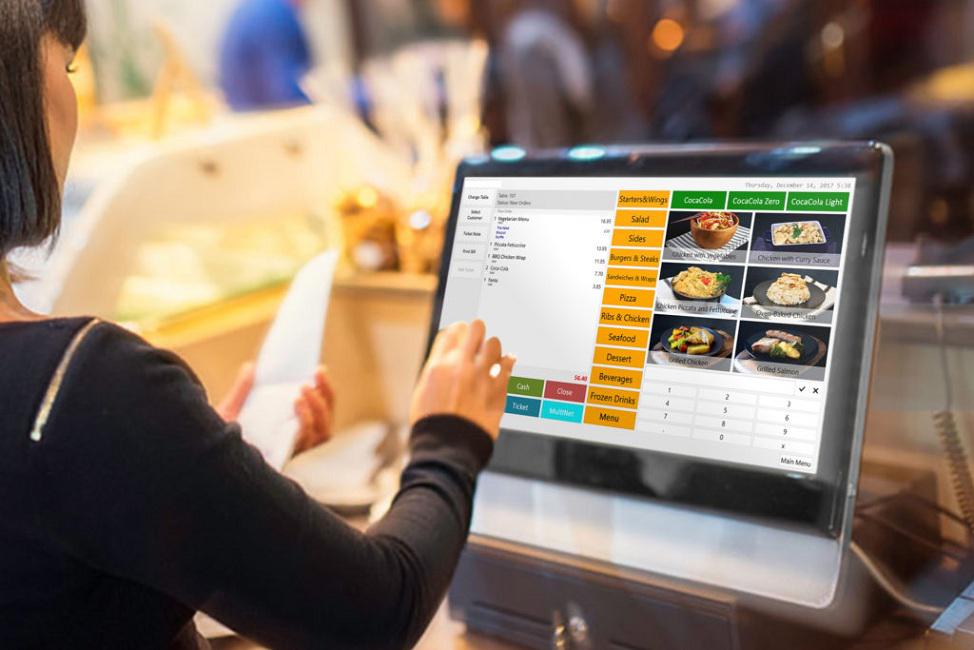
A POS (Point of Sale) system for office canteens is software and hardware that handles orders, payments, and operations. It tracks sales, manages inventory, and supports employee meals. In 2025, modern systems are cloud-based. They allow pre-orders via apps, cashless payments, and real-time reports.
Office canteens differ from restaurants. They focus on quick service during breaks, subsidies, payroll deductions, and reducing queues. A good POS cuts wait times, prevents food waste, and boosts employee happiness.
Why the Right POS Matters in 2025
Choosing well saves money and time. Bad systems cause long lines, stock errors, and lost sales. In offices, happy meals mean better productivity.
Trends in 2025 include contactless payments, mobile ordering, and data insights. Many companies use subsidies or wallets. The POS must handle these smoothly. It should also work offline during internet issues.
Key Features to Look For
Here are must-have features for office canteens:
- Cashless and Contactless Payments: Support UPI, cards, wallets, RFID badges, and payroll deductions. Quick and hygienic.
- Pre-Order and Mobile App: Employees order ahead via phone. Get alerts when ready. Cuts peak-hour crowds.
- Subsidy and Wallet Management: Set meal limits, company subsidies, or deductions from salary.
- Inventory Tracking: Auto-deduct stock, low-stock alerts, waste reduction.
- QR Code and Self-Service: Scan menus, order at kiosks for faster service.
- Real-Time Reports: Sales, popular items, peak times. Helps plan menus.
- Nutrition and Allergy Info: Show calories, allergens for health-focused offices.
- Offline Mode: Keep working if internet drops, sync later.
- Easy Interface: Simple training for staff. Role-based access.
- Integrations: Link to HR for payroll, accounting for GST.
Office Catering POS Solution often includes these for corporate setups.
Types of POS Systems for Canteens
- Cloud-Based: Best for 2025. Access anywhere, auto-updates, low cost upfront.
- On-Premise: Old style with servers. More expensive, less flexible.
- Hybrid: Cloud main with offline backup.
For offices, cloud wins for multi-location support and remote monitoring.
School Cafeteria POS Solution shares features like parent wallets, but offices need adult-focused subsidies.
How to Pick the Right One
Follow these steps:
- Assess Needs: How many employees? Subsidies? Pre-orders needed?
- Check Scalability: Grows with your company or multiple offices.
- Test Ease of Use: Demo the app and backend. Quick staff training?
- Look at Security: Data protection, especially payroll links.
- Compare Costs: Fixed monthly fees better than surprises. Include hardware.
- Read Reviews: Real user feedback on support and reliability.
- Ask for Demo/Trial: Test in your canteen setup.
- Check Support: 24/7 help important for busy operations.
Top Tips for Implementation
Plan migration of old data. Train staff well. Start small if possible. Monitor first weeks and adjust.
Good implementation means smooth launch and happy users.
Common Mistakes to Avoid
Don’t pick cheapest without features. Avoid complex systems that slow staff. Skip no-offline options. Ignore mobile apps—employees want them.
Conclusion
The right POS makes your office canteen efficient, fair, and enjoyable. Focus on cashless ease, pre-orders, and insights. This guide helps you decide confidently. For a reliable, modern option, explore Canteen POS.
FAQs
What is the best POS for a small office canteen?
Look for simple cloud systems with mobile ordering and basic payments. Start with fixed pricing.
Do office canteen POS systems support payroll deductions?
Yes, many integrate with HR for automatic salary deductions.
How much does a good canteen POS cost in 2025?
Plans start low with fixed monthly fees covering everything. Avoid hidden costs.
Can the POS work without internet?
Top ones have offline mode and sync when back online.
Is pre-ordering important for offices?
Yes, it reduces queues during lunch rushes.
How does a POS help reduce food waste?
Tracks sales to predict demand and alert low stock.
Are these POS systems secure for employee data?
Good ones use encryption and comply with standards.
Can parents or employees top up wallets?
Yes, via app or web for easy use.
What if we have multiple office locations?
Choose multi-site support with central control.
How long to set up a new POS?
Quick ones ready in days with good support.


 Roger Campbell