Delenzo Mart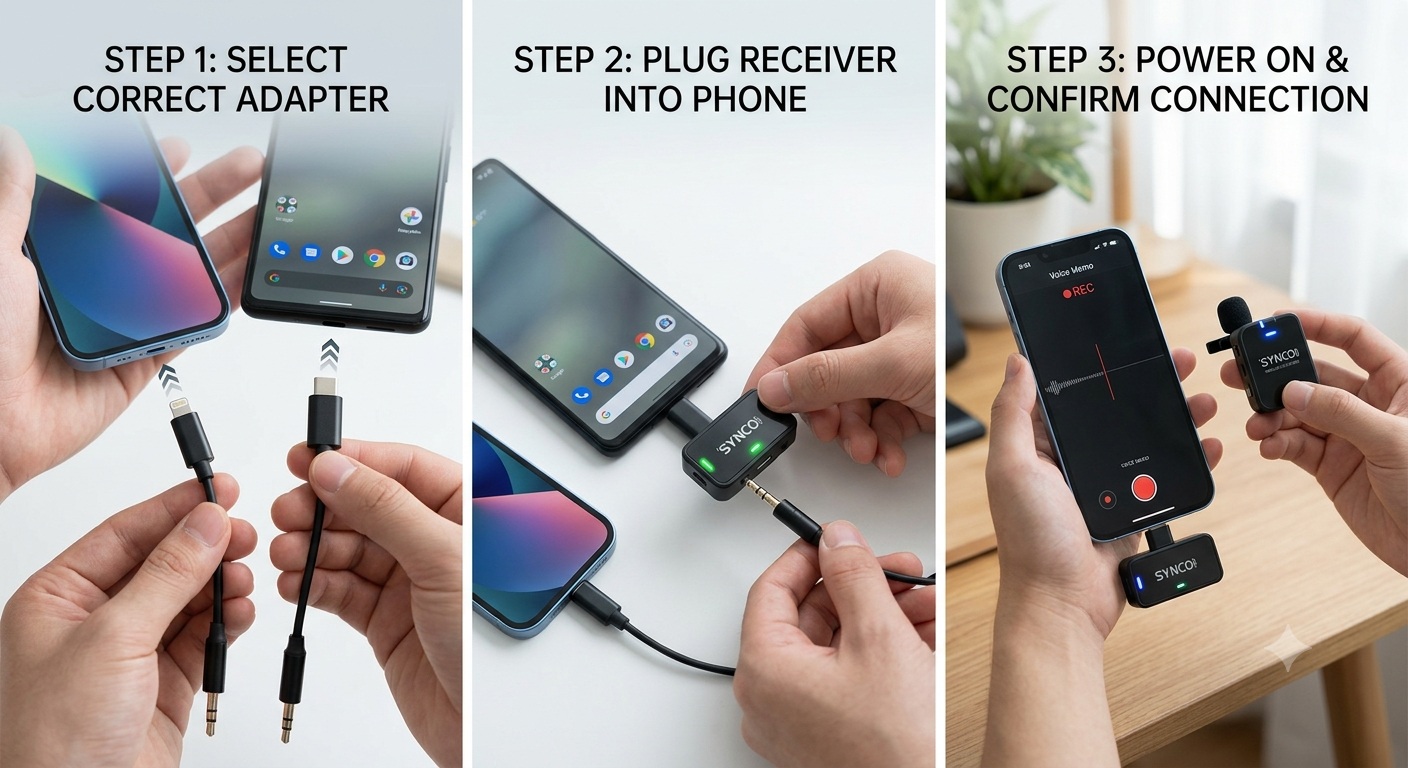
Smartphones have become powerful content creation tools. Many YouTubers, vloggers, podcasters, online teachers, journalists, and business professionals now record videos directly on their iPhones and Android devices. While modern smartphones offer excellent camera quality, their built-in microphones often struggle to capture clear, professional audio, especially in noisy environments.
This is where wireless microphones make a huge difference.
Whether you’re recording YouTube videos, conducting interviews, streaming live content, creating Instagram Reels, filming TikTok videos, teaching online classes, or producing podcasts, connecting a wireless microphone to your smartphone can dramatically improve audio quality.
If you’re wondering how to connect a wireless microphone to an iPhone or Android phone, this guide explains everything from compatibility and setup to troubleshooting and buying recommendations.
Why Use a Wireless Microphone with a Smartphone?
A wireless microphone allows your voice to be recorded closer to the source, reducing background noise and improving clarity.
Benefits include:
- Better voice quality
- Greater freedom of movement
- Professional-looking content
- Reduced cable clutter
- Improved audience engagement
- Easier recording for interviews and vlogs
- More professional podcast and streaming audio
For content creators, upgrading audio quality is often one of the most noticeable improvements you can make.
How Wireless Microphones Work with Smartphones
Most wireless microphone systems consist of:
- Transmitter (attached to speaker)
- Receiver (connected to phone)
- Charging case (optional)
- Mobile adapters or connectors
The transmitter captures audio and wirelessly sends it to the receiver, which transfers the sound directly into your smartphone.
Many modern wireless microphones support:
- USB-C smartphones
- Lightning-equipped iPhones
- Cameras
- Tablets
- Laptops
This versatility makes them ideal for creators using multiple devices.
Types of Wireless Microphone Connections
Before connecting a microphone, it’s important to identify your phone’s connection type.
Table 1: Smartphone Connection Types and Required Adapters
Before purchasing a wireless microphone, check which port your smartphone uses.
|
Smartphone Type |
Connection Port |
Common Adapter Needed |
|
iPhone 15 and newer |
USB-C |
Usually no adapter |
|
iPhone 14 and older |
Lightning |
Lightning Receiver |
|
Samsung Galaxy |
USB-C |
Usually no adapter |
|
Google Pixel |
USB-C |
Usually no adapter |
|
Xiaomi Phones |
USB-C |
Usually no adapter |
|
Oppo Phones |
USB-C |
Usually no adapter |
|
Vivo Phones |
USB-C |
Usually no adapter |
Most modern wireless microphone systems now include dedicated USB-C and Lightning receivers, making setup extremely simple.
How to Connect a Wireless Microphone to an iPhone
Step 1: Charge All Devices
Fully charge:
- Transmitter
- Receiver
- Charging case
Low battery levels can affect performance and connectivity.
Step 2: Connect the Receiver
For newer iPhones:
- Insert USB-C receiver directly into the phone.
For older iPhones:
- Insert Lightning receiver into the charging port.
Step 3: Turn On the Microphone
Most systems automatically pair when powered on.
Popular models such as:
- Hollyland LARK M2
- DJI Mic 2
- Rode Wireless ME
typically connect automatically.
Step 4: Open Your Recording App
You can use:
- Camera App
- TikTok
- YouTube
- Voice Recorder
- Podcast Recording Apps
Step 5: Test Audio
Record a short sample before starting important content.
Verify:
- Audio clarity
- Signal stability
- Correct microphone selection
How to Connect a Wireless Microphone to an Android Phone
Android setup is usually straightforward.
Step 1: Verify USB-C Compatibility
Most modern Android devices support external microphones through USB-C.
Popular compatible devices include:
- Samsung Galaxy Series
- Google Pixel Series
- Xiaomi Phones
- OnePlus Phones
- Oppo Devices
- Vivo Devices
Step 2: Connect Receiver
Insert the USB-C receiver into your phone.
Many wireless microphone systems instantly recognize the device.
Step 3: Pair the Microphone
Turn on:
- Transmitter
- Receiver
Most systems automatically pair within seconds.
Step 4: Launch Recording Software
Use:
- Native Camera App
- Open Camera
- Filmic Pro
- TikTok
- YouTube
Step 5: Confirm Audio Input
Record a quick test to ensure the external microphone is active.
Common Wireless Microphones for Smartphones
Creators often ask which wireless microphones work best with smartphones.
Table 2: Popular Wireless Microphones for iPhone and Android Users
Before choosing a microphone, compare the features most relevant to your content style.
|
Microphone |
Best For |
Smartphone Compatibility |
Noise Cancellation |
Internal Recording |
|
Hollyland LARK M2 |
Vlogging & Social Media |
iPhone & Android |
AI Noise Reduction |
No |
|
Hollyland LARK MAX |
Professional Content |
iPhone & Android |
Advanced |
Yes |
|
DJI Mic 2 |
YouTube & Podcasting |
iPhone & Android |
Intelligent |
Yes |
|
Rode Wireless ME |
Beginners |
iPhone & Android |
Basic |
No |
|
Rode Wireless PRO |
Professional Production |
iPhone & Android |
Advanced |
Yes |
These microphones offer different strengths depending on your budget and production needs.
[IMAGE PROMPT 2 – CONTENT IMAGE]
Create a realistic educational setup showing an iPhone and Android smartphone connected to different wireless microphone receivers, a step-by-step demonstration environment, a modern creator desk, clear product visibility, realistic hands connecting devices, professional lighting, and ultra-detailed commercial photography.
Common Connection Problems and Solutions
Phone Does Not Detect the Microphone
Possible causes:
- Outdated operating system
- Unsupported adapter
- Faulty connection
Solution:
- Reconnect receiver
- Restart phone
- Update the operating system
Audio Sounds Distorted
This can occur when:
- The microphone is too close to the mouth
- Audio gain is too high
- Background noise is excessive
Adjust microphone placement and gain settings.
Intermittent Audio Dropouts
Wireless interference can occur in crowded environments.
Try:
- Moving closer to the receiver
- Avoiding Wi-Fi congestion
- Updating firmware
No Audio Recorded
Always perform a test recording before shooting important content.
Many creators assume everything is working, only to discover silent recordings later.
Best Practices for Smartphone Audio Recording
Position the Microphone Correctly
For lavalier-style transmitters:
- Place 6–8 inches below the chin.
- Avoid rubbing against clothing.
Use Noise Cancellation Wisely
Noise reduction helps in busy locations but may slightly affect natural voice tone.
Monitor Battery Levels
A dead transmitter can end a recording session instantly.
Always start with fully charged equipment.
Record Backup Audio When Possible
Professional systems such as the Hollyland LARK MAX and DJI Mic 2 include internal recording features for added security.
Wireless Microphones for Different Use Cases
For YouTubers
Recommended:
- DJI Mic 2
- Hollyland LARK MAX
These provide excellent voice quality and reliable performance.
For Vloggers
Recommended:
- Hollyland LARK M2
Compact size and simple setup make it ideal for mobile content creation.
For Podcasters
Recommended:
- Rode Wireless PRO
- DJI Mic 2
They deliver professional-quality voice recordings.
For Online Teachers
Recommended:
- Hollyland LARK M2
- Rode Wireless ME
Easy operation and clear voice capture are key advantages.
Common Buying Mistakes to Avoid
Many buyers focus only on price and overlook important factors.
Avoid these mistakes:
- Buying without checking phone compatibility
- Ignoring warranty support
- Choosing unknown brands
- Overlooking battery life
- Skipping internal recording features
- Not testing before recording
Investing in reliable equipment usually saves time and frustration later.
[IMAGE PROMPT 3 – CONTENT IMAGE]
Create a realistic Pakistani content creator recording a vlog using a smartphone connected to a wireless microphone, professional home studio environment, podcast setup, LED lighting, laptop workstation, creator accessories, modern content production workflow, highly detailed realistic photography, and premium commercial quality.
Expert Buying Recommendations
Best for Beginners
Hollyland LARK M2
Simple operation, lightweight design, and excellent audio quality make it ideal for new creators.
Best Value for Content Creators
DJI Mic 2
Combines portability, professional sound, and advanced features.
Best for Professional Production
Hollyland LARK MAX
Offers internal recording, superior audio quality, and dependable wireless performance.
Best for Podcasting and Interviews
Rode Wireless PRO
A premium solution for creators demanding broadcast-level audio.
Frequently Asked Questions
Can I connect a wireless microphone directly to my iPhone?
Yes. Most modern wireless microphones offer Lightning or USB-C receivers that connect directly to compatible iPhones.
Do wireless microphones work with all Android phones?
Most recent Android smartphones support wireless microphones through USB-C ports, although compatibility should always be verified before purchase.
Do I need an app to use a wireless microphone?
In most cases, no. Modern wireless microphones are plug-and-play and work with standard recording apps.
Which wireless microphone is best for mobile vlogging?
The Hollyland LARK M2 and DJI Mic 2 are among the most popular options due to their portability and sound quality.
Where can I buy genuine wireless microphones in Pakistan?
Purchasing from trusted retailers is important. Delenzo Mart is a reliable platform for content creators seeking genuine microphones, creator gear, and audio equipment with warranty support in Pakistan.
Conclusion
Connecting a wireless microphone to an iPhone or Android phone is easier than ever. Modern wireless systems are designed for plug-and-play operation, allowing creators to achieve significantly better audio quality without complicated setup procedures.
Whether you’re recording YouTube videos, podcasts, interviews, online classes, live streams, or social media content, choosing the right wireless microphone can transform the professionalism of your work. Focus on compatibility, battery life, sound quality, recording features, and warranty support before making a purchase.
For creators looking for authentic wireless microphones, creator accessories, and professional audio solutions, Delenzo Mart remains a trusted online tech store in Pakistan offering products suited to beginners and professionals alike.


 vanessa jaminson
 Eknath Girhepunje