kavy jem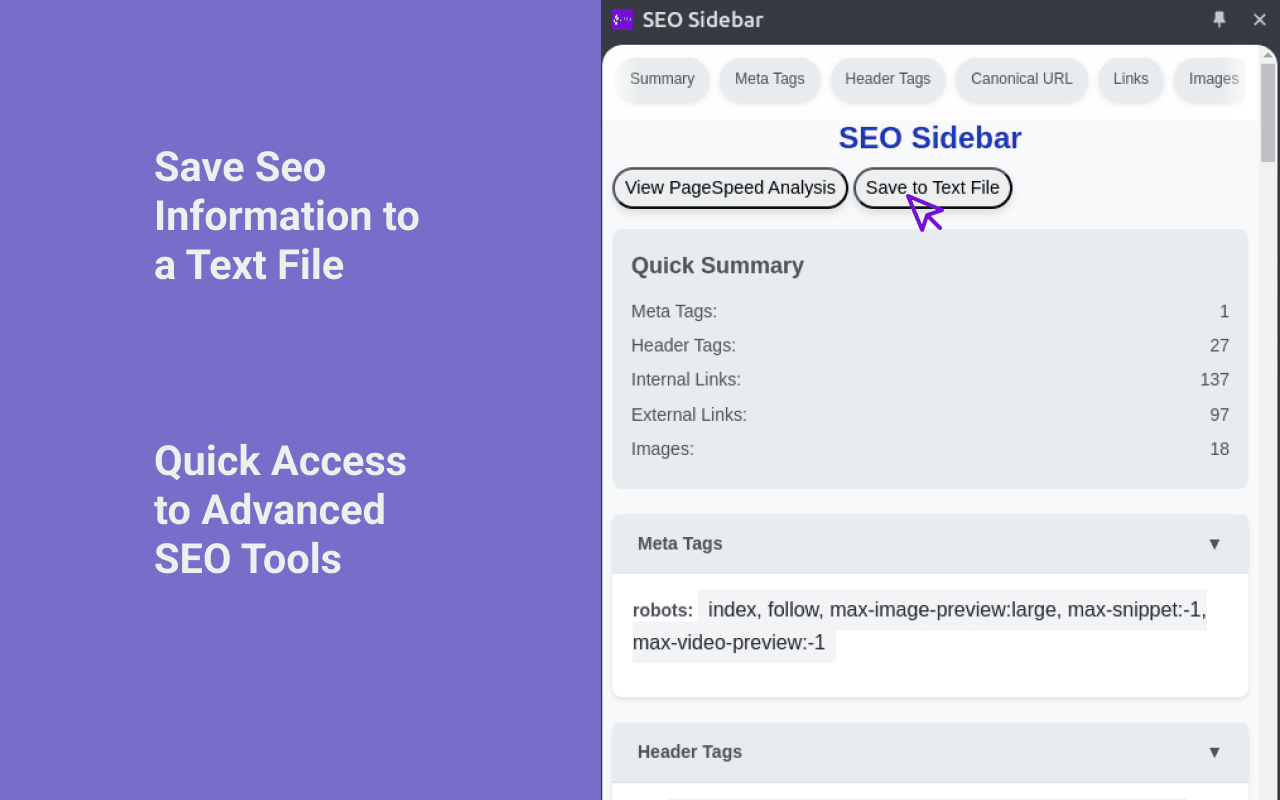
Most of us have had this moment. You open a client’s website, click through a few pages, and promise yourself you will just take a quick look at the basics. Titles, headings, canonicals, maybe a glance at schema. Twenty minutes later you have five tabs open, two browser extensions fighting for space in a tiny popup window, and a notebook full of half copied snippets. You switch pages and the popup closes. You reopen it. You lose your place. The rhythm breaks.
That friction adds up. SEO work is detail work, and detail work suffers when your tools interrupt your flow.
This article is about a different way to approach on page analysis inside the browser. We will start with the foundations of SEO and browser extensions, then look at what a SEO sidebar extension is, how it changes your workflow, and why that matters if you care about accuracy and speed. I will also share techniques you can use right away and answer common questions people search for when they evaluate SEO extensions.
The extension discussed here is the SEO Sidebar Extension created by SEOtoolbox.site. I will focus on how it works and where it fits in your process rather than trying to sell it to you.
What SEO Really Means at the Page Level
Search engine optimization is a broad term, but at its core it is about clarity. You want search engines to understand what your page is about, how it relates to other pages, and how it should appear in results. On page SEO handles the signals you control directly within the document and its markup.
When you audit a single page, you are looking at elements such as:
-
Title tags and meta descriptions
-
Header hierarchy
-
Canonical URLs
-
Internal and external links
-
Image alt attributes
-
Structured data
-
Open Graph and Twitter tags
Each of these elements tells a story. The title signals intent and topic. Headers show structure and emphasis. Canonical tags define the preferred version of a URL. Schema markup adds machine readable context. None of this requires keyword databases or backlink crawlers. It requires careful reading of the HTML and the rendered page.
That is where a browser extension becomes useful.
What a Browser Extension Does in SEO Work
A browser extension runs inside your browser. It has access to the page you are currently viewing and can read the document object model in real time. This means it can extract titles, meta tags, headers, links, images, and structured data directly from the live page.
Unlike cloud based tools that crawl from outside, an extension works from your session. It sees what you see. If you can load the page in your browser, the extension can analyze it. That has practical implications when you deal with sites behind login walls, aggressive bot protection, or dynamic rendering.
Many SEO extensions use a popup interface. You click the icon, a small window appears, you review the data, then it disappears when you click elsewhere or navigate to a new page. For quick checks this is fine. For deeper audits, it can feel cramped.
This is where the idea of a sidebar changes the experience.
What Is an SEO Sidebar Extension
1. What does SEO Sidebar Extension actually analyze on a page?
SEO Sidebar Extension analyzes the on page elements that are directly available in the page markup. This includes title tags, meta descriptions, robots directives, header tags, canonical URLs, internal and external links, image alt attributes, schema markup, and Open Graph and Twitter tags.
It reads the rendered document inside your browser session, which means the data reflects what the page is actually serving to users. It does not rely on external crawling infrastructure. Instead, it extracts structured information from the live DOM so you can evaluate technical on page signals as you browse.
2. How is SEO Sidebar Extension different from popup based SEO extensions?
Most SEO extensions use a popup interface that closes when you navigate away from the current page. SEO Sidebar Extension opens in a persistent side panel that remains visible while you browse.
As you move from one page to another, the sidebar updates automatically with the new page’s data. This allows you to review patterns across templates without reopening the tool repeatedly. The difference is less about features and more about workflow continuity. You maintain context as you navigate.
3. Can SEO Sidebar Extension analyze pages behind login or bot protection?
Yes, as long as you can access the page in your browser, the extension can analyze it. Because it runs locally within your Chrome session, it reads the rendered HTML that your browser receives.
This makes it useful for reviewing staging environments, gated dashboards, or websites that block common SEO crawlers. You are not dependent on external bots or API access. The analysis is based on the version of the page you are actively viewing.
4. Does SEO Sidebar Extension modify or affect the website being analyzed?
No. The extension does not alter page content, inject structural changes, or send modifications to the server. It reads existing markup and presents the information in the sidebar for inspection.
Its role is observational. It helps you audit and document on page SEO elements without interfering with the website itself. Any changes to the site must still be implemented in your CMS or codebase.
5. Can I export the data collected by SEO Sidebar Extension?
Yes. The extension allows you to export the analyzed data as a text report. This can be useful for documentation, client communication, or internal technical reviews.
Instead of manually copying titles, headers, or schema snippets, you can generate a structured export and annotate it with your findings. For consultants and in house teams, this reduces the time spent assembling basic technical summaries.
6. Is SEO Sidebar Extension suitable for beginners as well as experienced SEO professionals?
It works for both, but the value depends on how deeply you interpret the data. Beginners can use it to understand how meta tags and headers are structured on real websites. Seeing these elements laid out clearly often makes SEO concepts easier to grasp.
Experienced professionals can use it for fast template audits, validation checks, and structural comparisons across multiple pages. Because the data updates in real time as you browse, it supports quick diagnostics without interrupting your workflow.


 David Miller
 Robert Smith